

VALID Web-Development-Applications Exam Dumps For Certification Exam Preparation
Web-Development-Applications Dumps PDF 2025 Strategy Your Preparation Efficiently
NEW QUESTION # 33
Which CSS property defines whether users can see an element when it is rotated away from them?
- A. perspective-origin
- B. transform-style
- C. transform-origin
- D. backface-visibility
Answer: D
Explanation:
> "The `backface-visibility` CSS property determines whether or not the 'back' side of a transformed element is visible when facing the user. When set to `hidden`, the back face of the element is not visible when it is rotated." This is particularly relevant in 3D transformations like flipping cards.
References:
* MDN Web Docs: backface-visibility
* CSS Transforms Module Level 1 (W3C Specification)
---
NEW QUESTION # 34
What does a form field default to if the type attribute is omitted from a form?
- A. Text
- B. Date
- C. number
- D. Range
Answer: A
Explanation:
If thetypeattribute is omitted from an<input>element, it defaults totext.
* HTML Input Default Type:
* Default Type: The default value for thetypeattribute in an<input>element istext.
* Example:
* Given the HTML:
<input>
* This will render as a text input field.
:
MDN Web Docs -<input>
W3Schools - HTML Input Types
NEW QUESTION # 35
Given the following markup:
Where does the image align in relation to the text?
- A. The top of The image aligns to the top of Hello World
- B. The bottom of the image aligns to the top of Held world.
- C. The bottom of the Image aligns to the bottom of Hello World
- D. The lop of the image aligns the bottom of Hello world.
Answer: C
Explanation:
The CSS propertyvertical-align: baselinealigns the baseline of the element with the baseline of its parent. For inline elements like images, the baseline alignment means that the bottom of the image aligns with the bottom of the text.
* CSSvertical-alignProperty:
* Baseline Alignment: Aligns the baseline of the element with the baseline of its parent.
* Example:
<p>Hello World<img src="sample.jpg" style="vertical-align:baseline"></p>
* Analysis:
* The<img>element withvertical-align: baselinewill align its bottom with the bottom of the surrounding text "Hello World".
:
MDN Web Docs -vertical-align
W3C CSS Inline Layout Module Level 3
NEW QUESTION # 36
Which application programming interface (API) should a developer use to store data on a user's local device?
- A. Canvas
- B. File system
- C. Drag and drop
- D. History
Answer: B
Explanation:
> "The File System API allows web applications to store and retrieve data on a user's local device. It enables persistent, sandboxed access to a portion of the user's local file system."
>
> This API is designed for local storage beyond temporary in-memory or cookie-based solutions.
References:
* MDN Web Docs: File System API
* W3C File API Specification
---
NEW QUESTION # 37
Given the following CSS code: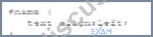
Which type of selector is used?
- A. Class
- B. Element
- C. Group
- D. ID
Answer: D
Explanation:
The given CSS code uses the#nameselector, which is an ID selector. The ID selector is used to style an element with a specific id attribute.
* ID Selector: In CSS, the ID selector is used to style the element with the specific id. The syntax for the ID selector is#id, whereidis the id attribute value of the HTML element.
* Usage Example:
#name {
text-align: left;
}
This CSS rule will apply thetext-align: left;style to the element withid="name".
* ID Selector Characteristics:
* An ID must be unique within a document, meaning it can be used only once per page.
* ID selectors are more specific than class selectors and element selectors.
* Example in HTML:
<div id="name">This is a div with ID "name".</div>
:
MDN Web Docs on CSS Selectors
W3C CSS Specification on Selectors
NEW QUESTION # 38
Which HTML element should a developer use to logically group a set of related HTML elements?
- A. Select
- B. Datalist
- C. input
- D. Fieldset
Answer: D
Explanation:
The <fieldset> element is used to group a set of related HTML elements in a form. It provides a way to logically group related controls and labels.
* Fieldset Element: The <fieldset> element can be used to create a group of form controls, along with an optional <legend> element that provides a caption for the group.
* Usage Example:
<fieldset>
<legend>Personal Information</legend>
<label for="name">Name:</label>
<input type="text" id="name" name="name">
<label for="email">Email:</label>
<input type="email" id="email" name="email">
</fieldset>
This groups the name and email input fields under the legend "Personal Information".
References:
* MDN Web Docs on <fieldset>
* W3C HTML Specification on Fieldset
NEW QUESTION # 39
A web designer creates the following HTML code:
Which CSS selector applies only to the first line?
- A. #Header
- B. .Welcome
- C. .header
- D. #Welcome
Answer: D
Explanation:
To apply CSS only to the first line of a particular HTML element, the ID selector #Welcome should be used as per the given HTML structure.
* CSS ID Selector: The ID selector is used to style the element with a specific id.
* Usage Example:
#Welcome {
color: red;
}
In this example, the #Welcome selector will apply the red color style only to the element with id="Welcome".
References:
* MDN Web Docs on ID Selectors
* W3C CSS Specification on Selectors
NEW QUESTION # 40
Which code segment correctly defines a function in JavaScript?
- A. Void addNumber(int a, int b)
- B. Function addNumbers (a, b)
- C. Void addNumbers(a, b)
- D. Function addNumber (in a, int b)
Answer: B
Explanation:
In JavaScript, functions are defined using thefunctionkeyword followed by the name of the function, a set of parentheses(), and a block of code enclosed in curly braces{}.
* Function Definition Syntax:
* Correct Syntax:
function addNumbers(a, b) {
// function body
}
* Explanation:
* function: Keyword to define a function.
* addNumbers: Name of the function.
* (a, b): Parameters for the function.
* { ... }: Function body containing the code to be executed.
* Incorrect Options:
* A. Void addNumbers(a, b): JavaScript does not usevoidto define functions.
* C. Void addNumber(int a, int b): JavaScript does not usevoidor type declarations (int).
* D. Function addNumber (in a, int b): JavaScript functions do not use type declarations.
:
MDN Web Docs - Functions
W3Schools - JavaScript Functions
NEW QUESTION # 41
A web page has a section that contains an `<article>` element. The element is always 10 pixels to the right of its normal position.
Which type of layout positioning should the `<article>` element use?
- A. Relative
- B. Static
- C. Absolute
- D. Fixed
Answer: A
Explanation:
> "Relative positioning allows an element to be positioned relative to its normal (static) position. For example, `left: 10px` shifts the element 10 pixels to the right of its original location."
>
> "Unlike `absolute` or `fixed`, relative positioning does not remove the element from the document flow." References:
* MDN Web Docs: position: relative
* CSS Positioning Module Level 3
---
NEW QUESTION # 42
Given the following CSS code: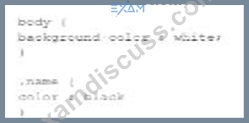
Which portion is the rule?
- A.

- B.

- C.

- D.

Answer: C
Explanation:
In CSS, a rule is composed of a selector and a declaration block. The rule is the entire part that defines how styles should be applied to elements matching the selector.
* CSS Rule Components:
* Selector: Identifies the HTML elements to be styled (e.g., body, .name, #item).
* Declaration Block: Contains one or more declarations, each consisting of a property and a value, enclosed in curly braces {}.
* Example Analysis:
* Option A:
body {
background-color: white;
}
This is the full rule, consisting of the selector body and the declaration block { background-color: white; }.
* Option B:
background-color: white;
This is just a declaration, not a complete rule.
background-color: white,
This is an incorrect declaration due to the comma, and not a complete rule.
* Option D:
color: black
This is just a declaration, not a complete rule.
* References:
* W3C CSS Syntax and Basic Data Types Module Level 3
* MDN Web Docs - CSS Syntax
NEW QUESTION # 43
What does declaring <!DOCTYPE html> indicate to the browser?
- A. The code is written in HTML4.
- B. The file extension is HTML5.
- C. The file extension is HTML4.
- D. The code is written in HTML5.
Answer: D
Explanation:
From the W3C HTML5 Recommendation, section "2.5 The DOCTYPE":
"A DOCTYPE is a required preamble. DOCTYPEs are required for legacy reasons. When omitted, browsers tend to use a different rendering mode that is incompatible with some specifications. Including the DOCTYPE in a document ensures that the browser makes a best-effort attempt at following the relevant specifications.
A DOCTYPE must consist of the following components, in this order:
* The string <!DOCTYPE (case-insensitive).
* One or more whitespace characters.
* The string html (case-insensitive).
* Optionally, a legacy DOCTYPE string.
* Zero or more whitespace characters.
* A > character.
In other words, <!DOCTYPE html> exactly."
And from MDN Web Docs' "<!DOCTYPE>" entry:
"The <!DOCTYPE html> declaration informs the browser that the page is written in HTML5 and that it should be rendered in standards mode (instead of quirks mode). It is the simplest, case-insensitive form of DOCTYPE defined by HTML5." Together, these extracts confirm that <!DOCTYPE html> tells the browser the document uses HTML5 and directs it to render according to the HTML5 (standards) specification rather than falling back to legacy rendering modes.
References:
W3C HTML5 Recommendation, section "2.5 The DOCTYPE"
MDN Web Docs: "<!DOCTYPE>"
NEW QUESTION # 44
Which HTML tag should a developer use to create a drop-down list?
- A. <Section >
- B. <Option>
- C. <Output>
- D. <Select>
Answer: D
Explanation:
The<select>tag is used in HTML to create a drop-down list. It is used in conjunction with the<option>tags to define the list items within the drop-down menu.
* Purpose of<select>: The<select>element is used to create a control that provides a menu of options.
The user can select one or more options from the list.
* Structure of Drop-down List:
* The<select>element encloses the<option>elements.
* Each<option>element represents an individual item in the drop-down list.
* Usage Example:
<label for="cars">Choose a car:</label>
<select id="cars" name="cars">
<option value="volvo">Volvo</option>
<option value="saab">Saab</option>
<option value="fiat">Fiat</option>
<option value="audi">Audi</option>
</select>
In this example, the<select>tag creates a drop-down list with four options: Volvo, Saab, Fiat, and Audi.
* Attributes of<select>:
* name: Specifies the name of the control, which is submitted with the form data.
* id: Used to associate the<select>element with a label using the<label>tag'sforattribute.
* multiple: Allows multiple selections if set.
:
MDN Web Docs on<select>
W3C HTML Specification on Forms
NEW QUESTION # 45
Which code segment contains a conditional expression?
- A. `var result = count++ > 10;`
- B. `var result = count > 10 ? "Done" : getResult();`
- C. `var result = dataCount;`
- D. `var result = aCount * 1000 == 3000000;`
Answer: B
Explanation:
> "The conditional (ternary) operator `? :` is a shortcut for an `if...else` statement. It is the only operator in JavaScript that takes three operands: a condition followed by a question mark (?), an expression to execute if the condition is true, and another expression if false." Example:
```javascript
var result = condition ? value1 : value2;
```
References:
* MDN Web Docs: Conditional (ternary) operator
* ECMAScript Specification: ConditionalExpression
---
NEW QUESTION # 46
Given the following code:
What does the console display as output?
- A. 0
- B. 1
- C. 2
Answer: A
Explanation:
Given the code segment:
var a = "8";
var b = "6";
var c = a + b;
console.log(c);
This code concatenates two strings.
* Explanation:
* var a = "8";: Variable a is assigned the string "8".
* var b = "6";: Variable b is assigned the string "6".
* var c = a + b;: The + operator concatenates the two strings, resulting in "86".
* console.log(c);: Outputs the value of c to the console.
* Output:
* The console displays "86" because it concatenates the two string values.
* References:
* MDN Web Docs - String
* W3Schools - JavaScript String
NEW QUESTION # 47
A web page includes the following CSS code:
```css
@keyframes anim_01 {
0% { left: 0px; top: 0px; }
50% { left: 200px; top: 0px; }
100% { left: 600px; top: 0px; }
}
.animation {
position: relative;
animation-name: anim_01;
animation-duration: 4s;
animation-timing-function: linear;
animation-iteration-count: infinite;
animation-direction: alternate;
animation-play-state: running;
}
```
What happens to the animation when the style is invoked?
- A. It moves horizontally across the screen.
- B. It moves vertically across the screen.
- C. It scales in size by 0% and then by 600%.
- D. It scales in size by 200% and then by 600%.
Answer: A
Explanation:
> "The animation changes the `left` property from 0px to 600px while keeping the `top` at 0px throughout.
This means the animation causes horizontal movement only."
>
> "Since `position: relative` is set, changes in `left` and `top` move the element relative to its normal position." Thus, the element moves horizontally across the screen, alternating direction infinitely.
References:
* MDN Web Docs: CSS animation-direction, animation-name
* CSS Animations Module Level 1 Specification
---
NEW QUESTION # 48
Give the following HTML code: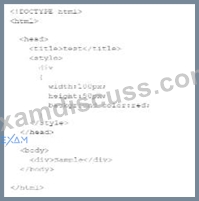
Which CSS property would make the corners of the div rounded?
- A. Border-collapse
- B. Border-width
- C. Border-radius
- D. Border-style
Answer: C
Explanation:
To make the corners of a div element rounded, the CSS property border-radius is used. This property allows you to define how rounded the corners should be by specifying a radius.
* CSS border-radius Property:
* Syntax:
div {
border-radius: 10px;
}
* Description: The value can be in pixels (px), percentages (%), or other units. Higher values create more rounded corners.
* Example:
* Given HTML:
<div>Sample</div>
* Given CSS:
div {
width: 100px;
height: 50px;
background-color: red;
border-radius: 10px;
}
* References:
* MDN Web Docs - border-radius
* W3C CSS Backgrounds and Borders Module Level 3
NEW QUESTION # 49
What should a developer increase to create space between a border and content?
- A. Height
- B. Margin
- C. Padding
- D. Width
Answer: C
Explanation:
Padding is the CSS property used to create space between the content of an element and its border. It is an internal spacing within the element.
* CSS Box Model:
* Content: The innermost part, where text and images appear.
* Padding: The space between the content and the border.
* Border: The edge of the element.
* Margin: The space outside the border, creating space between different elements.
* Usage:
* Padding:
div {
padding: 20px;
}
* This code adds 20 pixels of padding on all sides of the content within thedivelement.
:
MDN Web Docs - Padding
W3C CSS Box Model
NEW QUESTION # 50
Which characters are used to enclose multiple statement in a function?
- A. Parentheses
- B. Semicotons
- C. Curly braces
- D. Spaces
Answer: C
Explanation:
In JavaScript, curly braces {} are used to enclose multiple statements in a function, defining the block of code to be executed.
* Curly Braces: Curly braces {} are used to group multiple statements into a single block. This is necessary for defining the body of a function, loops, conditional statements, and other control structures.
* Usage Example:
function greet(name) {
let greeting = "Hello, " + name;
console.log(greeting);
}
In this example, the curly braces enclose the statements that form the body of the greet function.
References:
* MDN Web Docs on Functions
* ECMAScript Language Specification
NEW QUESTION # 51
Which CSS transformation method should a developer use to reposition an element horizontally on the 2-D plane?
- A. Scalex(n)
- B. Scale (x,y)
- C. Translatex(n)
- D. Skewx (angle)
Answer: C
Explanation:
ThetranslateX(n)method in CSS is used to move an element horizontally on the 2-D plane by a specified distance. This transformation repositions the element along the X-axis.
* translateX(n)Method: ThetranslateX(n)function moves an element horizontally bynunits. Positive values move the element to the right, while negative values move it to the left.
* Usage Example:
element {
transform: translateX(100px);
}
In this example, the element is moved 100 pixels to the right.
* Properties:
* n: This represents the distance to move the element. It can be specified in various units such as pixels (px), percentages (%), ems (em), etc.
:
MDN Web Docs ontransform
W3C CSS Transforms Module Level 1
NEW QUESTION # 52
What is a common technique to ensure users can access all content on a mobile web page?
- A. A link to the full site
- B. Targeted site content
- C. Navigation links requiring scrolling
- D. Access to multiple link layers
Answer: A
Explanation:
Providing a link to the full site on a mobile web page is a common technique to ensure users can access all content if they find the mobile version limiting.
* Advantages:
* Access to Full Functionality: Users can switch to the desktop version if they need features not available on the mobile site.
* User Control: It gives users the choice to view the site in a layout they are more comfortable with.
* Other Options:
* A. Access to multiple link layers: This does not directly address user needs for full site access.
* B. Targeted site content: While important, it does not replace the need for a full site link.
* D. Navigation links requiring scrolling: This can worsen the user experience on mobile devices.
* References:
* Google Developers - Mobile Site Design
NEW QUESTION # 53
What is the process for JavaScript from validation?
- A. User input is sent to the server after the form is completed tor validation.
- B. User input is sent to the server as fields are completed for validation.
- C. Form fields are validated after the form is submitted but before form data is sent to the server
- D. Form fields are validated as me user inputs data after form data is sent to the server.
Answer: C
Explanation:
JavaScript form validation typically occurs after the form is submitted but before the form data is sent to the server. This allows the client-side script to check the input data and prevent the form from being submitted if the data is invalid.
* Client-Side Validation:
* Before Form Submission: JavaScript validates the form fields after the user attempts to submit the form.
* Prevent Default Submission: If the validation fails, JavaScript can prevent the form from being submitted and display appropriate error messages.
* Usage Example:
document.getElementById("myForm").addEventListener("submit", function(event) { var isValid = true;
// Perform validation checks
if (!isValid) {
event.preventDefault(); // Prevent form submission
alert("Please correct the errors.");
}
});
This example prevents form submission if the validation fails.
References:
* MDN Web Docs on Form Validation
* W3C HTML Specification on Form Submission
NEW QUESTION # 54
......
Latest Verified & Correct Web-Development-Applications Questions: https://www.examdiscuss.com/WGU/exam/Web-Development-Applications/
100% Pass Guaranteed Download Courses and Certificates Exam PDF Q&A: https://drive.google.com/open?id=1tFidRPKuVC7g4o4oKHINg_c2YTrwl5u1