

Pass Adobe AD0-E327 PDF Dumps | Recently Updated 52 Questions
Updated Test Engine to Practice AD0-E327 Dumps & Practice Exam
NEW QUESTION # 17
A business practitioner created a budget campaign template to control scheduled invoiced marketing. After creating the campaign template and defining the job parameters (as shown below), the business practitioner was unable to see the link to configure budget details.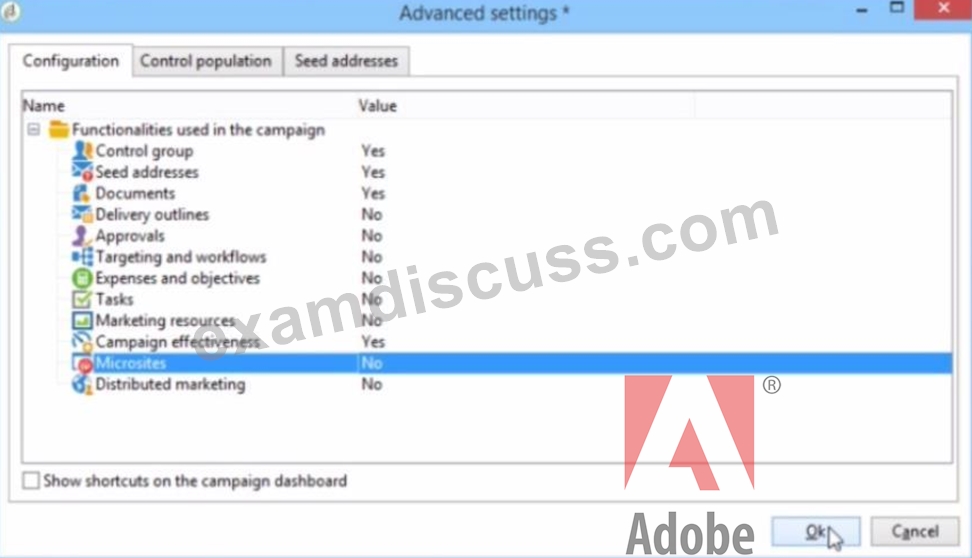
What should they configure to enable budget detail properties?
- A. Activate Marketing Resources
- B. Activate Distributed Marketing
- C. Activate Expenses and Objectives
- D. Activate Targeting and Workflows
Answer: C
Explanation:
According to the Adobe Campaign Classic Business Practitioner Exam Guide1, one of the tasks that you should be able to perform as an Adobe Campaign Business Practitioner is to control costs.
Adobe Campaign lets you control scheduled, committed and invoiced marketing costs and to break them down by category using the Marketing Resource Management module1. This module allows you to define budgets for your campaigns and programs, as well as providers and stocks.
To enable budget detail properties for a campaign template, you need to activate the Expenses and Objectives option in Advanced campaign settings1. This option will display a Budget tab in the campaign template where you can configure budget details such as cost entries, providers, stocks, etc.
https://experienceleague.adobe.com/docs/campaign-classic/using/mrm/controlling-costs.html?lang=en In the context of Adobe Campaign Classic, budget details for a campaign are typically managed through the
'Expenses and Objectives' functionality. This feature allows business practitioners to set and track the budget and cost-related details for their marketing campaigns. When this option is activated in the campaign template's advanced settings, it enables the functionality to enter and manage financial details such as budgeted amounts, actual costs, and associated financial objectives. Therefore, to enable budget detail properties in a budget campaign template, the business practitioner should select the 'Expenses and Objectives' option and set its value to 'Yes' in the 'Advanced settings' tab under the 'Configuration' section as shown in the interface provided.
NEW QUESTION # 18
A business practitioner is preparing a presentation and needs to list and report the email errors.
Which contains the possible delivery bounce types?
- A. Hard, Medium, Soft, Unreachable
- B. Hard, Soft, Ignored
- C. High, Medium, Light
- D. Hard, Soft, Unreachable
Answer: D
Explanation:
In the context of email delivery errors, 'Hard' bounces refer to permanent delivery failures (such as an invalid email address), 'Soft' bounces are temporary delivery issues (such as a full inbox), and 'Unreachable' typically means that the email server could not be reached or is not responding. These terms categorize delivery errors based on their nature and help in analyzing the deliverability issues of an email campaign.References:The categorization of bounce types into Hard, Soft, and Unreachable is standard terminology in email marketing for classifying delivery errors.
NEW QUESTION # 19
A Campaign business practitioner creates populations in four queries: A, B, C, and D. Campaign requirements state that the final targeting population can include population A or C. Anyone in both population B and D must be excluded from the final targeting population.
How should the practitioner configure the workflow?
- A. Union A and C
Intersect B and D
Exclude results of intersection BD from union AC
Use the exclusion's complement as targeting population - B. Union A and C
Union B and D
Intersect results of AC with union results BD
Use the intersection's complement as targeting population - C. Union A and C
Union B and D
Exclude results of union BD from results of union AC - D. Union A and C
Intersect B and D
Exclude results of Intersection BD from Union AC
Answer: D
Explanation:
Explanation
the best way to configure the workflow is to use set operations such as union, intersection and exclusion. You can use these operations to combine or separate populations based on different criteria.
To achieve the campaign requirements, you need to follow these steps:
* Union A and C. This operation will create a population that includes anyone in population A or C or both.
* Intersect B and D. This operation will create a population that includes only those who are in both population B and D.
* Exclude results of intersection BD from union AC. This operation will create a population that includes anyone in union AC except those who are also in intersection BD.
NEW QUESTION # 20
A business practitioner needs to identify the total number of complaints for a given delivery by domain.
What out-of-the-box report would provide this information?
- A. Tracking indicators
- B. Non-deliverables and bounces
- C. Hot clicks
- D. URLs and click streams
Answer: B
Explanation:
Explanation
According to the web sources123, Adobe Campaign provides several out-of-the-box reports that can help analyze and represent data for different purposes. Some of these reports are:
* URLs and click streams: This report shows the number of clicks on each URL contained in a delivery, as well as the click stream for each recipient.
* Tracking indicators: This report shows the main tracking indicators for a delivery, such as opens, clicks, bounces, etc.
* Non-deliverables and bounces: This report shows the number and type of non-deliverables and bounces for a delivery, as well as the breakdown by domain.
* Hot clicks: This report shows a graphical representation of the clicks on each link contained in a delivery.
Non-deliverables and bounces. This out-of-the-box report would provide information about the total number of complaints for a given delivery by domain.
NEW QUESTION # 21
A company's data includes recipients and transactions for recipients with a one(recipient) to many(transactions) relationship.
What is the most efficient configuration of a workflow Query activity to select all transactions in a particular time period?
- A. Select "Transactions" as the targeting dimension, and edit the filtering conditions to the specific Transaction dates
- B. Create a list and reference the list in the Query activity
- C. Use the default Targeting and Filtering conditions of a Query, then edit the filtering conditions to select transactions for the specific Transaction dates
- D. Use an Incremental query and set the Scheduler to select transactions on a certain date and time
Answer: A
Explanation:
Explanation
a query activity allows you to filter and extract a population of elements from the Adobe Campaign database2
. You can select a targeting dimension and define filter conditions to specify your query criteria12.
An incremental query lets you periodically select a target based on a criterion, while excluding the people already targeted for this criterion4. The population already targeted is stored in the memory by workflow instance and by activity4.
A list is a set of recipients that can be used as an input for other activities such as deliveries or queries3. You can create a list manually or use an existing one.
NEW QUESTION # 22
The data analytics team confirms that a CSV file of high-intent customers has been extracted from the Enterprise Data Warehouse and placed on the Adobe SFTP server ready for use in a trial campaign. The workflow consists of a file collector, data loading activity, and an enrichment to reconcile customers using recipient IDs. A business practitioner runs the workflow and an error occurs during the enrichment activity.
What could be causing the error?
- A. The Data loading activity has not been configured to format the recipient ID field in the file
- B. The Data loading activity has not been configured with a representative sample file
- C. The sequence of activities is incorrect and requires attention
- D. The Recipient IDs in the file do not exist in the target schema
Answer: D
Explanation:
Explanation
Adobe Campaign allows you to create and execute workflows that automate your marketing processes and data flows. You can use various activities in your workflows, such as file collector, data loading and enrichment2.
The enrichment activity can be used to configure data reconciliation between the data in the Adobe Campaign database and the data in a work table. You need to define the link between the two data sources using a common field, such as recipient ID2.
One possible reason for an error during the enrichment activity is that the recipient IDs in the file do not exist in the target schema. This means that there is no matching record for each recipient ID in the file in the Adobe Campaign database. This could cause a reconciliation failure or an empty result set.
https://experienceleague.adobe.com/docs/campaign-classic/using/automating-with-workflows/targeting-activities
NEW QUESTION # 23
A business practitioner has been deploying a campaign and running the delivery. The practitioner notices that delivery paused at the time of approval.
What is the named right required to resume the delivery?
- A. PREPARE DELIVERIES
- B. APPROVE ADMINISTRATION
- C. APPROVE DELIVERIES
- D. START DELIVERIES
Answer: C
Explanation:
In Adobe Campaign, the named right "APPROVE DELIVERIES" is required to approve deliveries within the workflow. If a delivery has paused at the time of approval, it means that it requires an approval action to proceed. A user with the "APPROVE DELIVERIES" right has the authority to review and approve the delivery, thereby resuming the process.References:User permissions and named rights are a key aspect of workflow management in Adobe Campaign, where specific actions such as approving deliveries require corresponding rights assigned to the user.
NEW QUESTION # 24
During a data investigation, a business practitioner modifies workflow properties to keep the results of interim populations between two executions.
What are two purposes of this step? (Choose two.)
- A. To export data that is being passed between two activities in the workflow
- B. To analyze data that is being passed between two activities in the workflow
- C. To save data created with each run of the workflow to a list
- D. To modify the data that is being passed between two activities in the workflow
- E. To configure the schema of the data that is passed between two activities in the workflow
Answer: B,C
Explanation:
Explanation
The two purposes of modifying workflow properties to keep the results of interim populations between two executions are D. To save data created with each run of the workflow to a list and E. To analyze data that is being passed between two activities in the workflow.
Saving data created with each run of the workflow to a list allows the business practitioner to keep track of the data generated by the workflow. This can be useful for analyzing the data and for troubleshooting any issues that may arise. Analyzing data that is being passed between two activities in the workflow can help the business practitioner to identify any issues with the workflow and to optimize the workflow for better performance.
NEW QUESTION # 25
The data analytics team confirms that a CSV file of high-intent customers has been extracted from the Enterprise Data Warehouse and placed on the Adobe SFTP server ready for use in a trial campaign. The workflow consists of a file collector, data loading activity, and an enrichment to reconcile customers using recipient IDs. A business practitioner runs the workflow and an error occurs during the enrichment activity.
What could be causing the error?
- A. The Recipient IDs in the file do not exist in the target schema
- B. The Data loading activity has not been configured with a representative sample file
- C. The sequence of activities is incorrect and requires attention
- D. The Data loading activity has not been configured to format the recipient ID field in the file
Answer: D
Explanation:
During a workflow, if an error occurs during the enrichment activity, it often indicates a mismatch or configuration issue with the data being processed. If the data loading activity has not been configured correctly to format the recipient ID field according to the expected format in the Adobe Campaign database, the enrichment activity will fail to reconcile the customers. This is because the enrichment relies on matching the formatted recipient IDs in the workflow with those in the target schema. If there's a formatting discrepancy, the process cannot successfully match and enrich the data, leading to an error.References:This explanation is derived from general knowledge of data integration and workflow processes in systems like Adobe Campaign Classic, where data loading and enrichment activities are key components of campaign workflows.
NEW QUESTION # 26
During the discovery phase, a business practitioner received a request to add secondary email addresses for recipients.
What should the business practitioner do to deliver notifications to the new addresses?
- A. Create a new delivery template
- B. Edit the "To" field in the delivery object
- C. Use the out-of-the-box target recipient target mapping
- D. Use a custom target mapping
Answer: D
Explanation:
To deliver notifications to the new email addresses, the business practitioner should use a custom target mapping1.
A custom target mapping is used to map the fields in the delivery object to the fields in the target database1.
https://sendpulse.com/support/glossary/email-notification
To deliver notifications to secondary email addresses for recipients, a business practitioner needs to adjust the targeting configuration to include these additional contact points. By using a custom target mapping, the practitioner can define a schema that includes the secondary email addresses and instructs the campaign to use this data when sending communications. Custom target mappings allow the practitioner to define additional fields beyond the default schema, enabling the delivery of messages to alternative email addresses associated with the recipients.References:The answer is based on the functionality of target mappings in Adobe Campaign Classic, which allow for the customization of recipient targeting for campaign deliveries.
NEW QUESTION # 27
An Adobe Campaign business practitioner has been given the following form and needs to make changes.
<form name="book" namespace="cus" type="contentForm">
<input xpath="@name"/>
<input xpath="@date"/>
<input xpath="@language"/>
</form>
Which attribute does the practitioner need to change to fix the layout of the form?
- A. xpath="@name"
- B. type="contentForm"
- C. namespace="cus"
Answer: B
Explanation:
a web form is a set of fields that enables you to collect data from visitors on your website1. You can define the layout of your web form by using templates (style sheets) that determine how the form will be displayed3.
An input form is a type of content that lets you create and edit data in Adobe Campaign2. You can use input forms to design messages, create workflows, manage lists, etc2.
A contentForm is an attribute that specifies the type of input form used to edit an element4. For example, type="contentForm" means that the element can be edited using a content editor.
NEW QUESTION # 28
An Adobe Campaign business practitioner is extracting data using a "Data Extraction" activity of a workflow.
What step should be taken to filter the final result of the aggregate for customers who have ordered more than
10 times?
- A. Handle groupings (UNION + SELECT)
- B. Handle groupings (COMBINE + DEDUPE)
- C. Handle groupings (GROUP BY + HAVING)
Answer: C
Explanation:
Explanation
a data extraction activity allows you to extract data from Adobe Campaign database and export it to a file1
. You can select the data to be extracted, the file format, and the output location1.
The handle groupings option lets you group data by one or more criteria and apply aggregate functions such as count, sum, average, etc2. You can also filter the final result of the aggregate by using a having clause2.
the step that should be taken to filter the final result of the aggregate for customers who have ordered more than 10 times would be option A. Handle groupings (GROUP BY + HAVING) would allow you to group customers by their order count and filter those who have ordered more than 10 times.
NEW QUESTION # 29
During development or testing, what are two ways a business practitioner can avoid leaving a workflow in a paused state? (Choose two.)
- A. Click on the Stop icon on the workflow task bar
- B. Add an End activity to the final transition of a workflow
- C. Add a Stop activity to the final transition of a workflow
- D. Right click on the workflow palette and choose "Purge History"
- E. Under Admin/Workflows, select "stop all workflows"
Answer: B,C
Explanation:
To avoid leaving a workflow in a paused state during development or testing, adding a Stop activity ensures that the workflow is forcibly stopped after all the activities have been processed. Additionally, adding an End activity at the end of a workflow is a standard practice for defining a clear endpoint, after which the workflow will not proceed. Both these activities help prevent workflows from remaining in an unintended paused state.
It's important to use these activities as they are designed to provide a clean termination of the workflow's execution.References:These recommendations are based on standard practices within workflowmanagement in automation systems like Adobe Campaign Classic, where Stop and End activities are common features.
NEW QUESTION # 30
A customer wants to trigger an email on a specified frequency based on the customer journey.
Given that the customer wants the delivery statistics consolidated, what kind of email delivery should the business practitioner configure in this scenario?
- A. Recurring delivery with email content pulled from the delivery template
- B. Recurring delivery with email content configured in the email delivery activity
- C. Continuous delivery with email content configured in the email delivery activity
- D. Continuous delivery with email content pulled from the delivery template
Answer: A
Explanation:
In scenarios where a customer wishes to trigger emails based on the customer journey and wants consolidated delivery statistics, a recurring delivery is appropriate. This type of delivery repeats at specified intervals, which can align with the frequency dictated by the customer journey stages. By pulling content from the delivery template, the practitioner ensures consistency in the email content across different sends while benefiting from the cumulative statistics that a recurring delivery provides, allowing for a consolidated view of delivery performance over time.References:Recurring deliveries are a feature within Adobe Campaign Classic that allows for the repeated sending of a delivery on a set schedule, which is useful for consistent communications and consolidated reporting.
NEW QUESTION # 31
A business practitioner wants to give one of the team members access to all pre-defined filters, dashboards, and web application, regardless of users rights to folders. This must include read, write, and delete data.
What is the right way to give access?
- A. By selecting Access Rights explicitly
- B. By selecting Propagate option
- C. By selecting the Operators to the authorization field
- D. By selecting System Folder
Answer: D
Explanation:
Explanation
By selecting System Folder. This is the right way to give access to all pre-defined filters, dashboards, and web application, regardless of users rights to folders. This also includes read, write, and delete data permissions for these objects.
https://experienceleague.adobe.com/docs/campaign-classic/using/getting-started/permissions/access-managemen
NEW QUESTION # 32
An Adobe Campaign business practitioner has been checking the delivery report of all the deliveries sent from Adobe Campaign one year ago from current date, but the data shown in the report is zero for all the deliveries.
What is a possible reason for this?
- A. Tracking log table has data storage validity of only one year
- B. Delivery log table has data storage validity of only one year
- C. Recipient table has data storage validity of only one year
Answer: A
Explanation:
Explanation
According to the web source1, Adobe Campaign has default retention periods for standard tables that store data related to deliveries and tracking. These retention periods can be modified by administrators to comply with data protection regulations or performance requirements2. The default retention periods for some of the standard tables are:
* Consolidated tracking: 6 months
* Delivery logs: 6 months
* Tracking logs: 13 months
possible reason for the data shown in the report being zero for all the deliveries sent one year ago from current date is C. Tracking log table has data storage validity of only one year. This means that after one year, the data in this table is deleted and no longer available for reporting.
NEW QUESTION # 33
One of the IP ranges listed on the IP allowing list in the Adobe Campaign Control Panel is shown as "Expired" and will be automatically deleted after 7 days.
Which option is the business practitioner allowed to perform within this 7-day period?
- A. Edit the duration of the expired IP range.
- B. Change the IP status to "Active" in the server configuration file.
- C. Create another IP range that overlaps the expired range.
Answer: A
Explanation:
Explanation
Within the 7-day period, the business practitioner is allowed to edit the duration of the expired IP range. This can be done by selecting the IP range and clicking on the "Edit" button. The business practitioner can then change the duration of the IP range to a new value.
NEW QUESTION # 34
A business practitioner needs to identify the total number of complaints for a given delivery by domain.
What out-of-the-box report would provide this information?
- A. Tracking indicators
- B. Non-deliverables and bounces
- C. Hot clicks
- D. URLs and click streams
Answer: B
Explanation:
To identify the total number of complaints for a given delivery by domain, the "Non-deliverables and bounces" report would be appropriate. This report typically includes data on email delivery issues, which encompass bounces, spam complaints, and other non-delivery related events categorized by domain.
Complaints are a form of non-deliverable where the recipient's email server has accepted the email but classified it as spam or junk, often feeding back to the sending server as a complaint.References:This functionality is part of Adobe Campaign Classic's reporting capabilities, providing insight into the deliverability issues including complaints by domain.
NEW QUESTION # 35
......
Adobe AD0-E327 Dumps Cover Real Exam Questions: https://www.examdiscuss.com/Adobe/exam/AD0-E327/
Dumps Collection AD0-E327 Test Engine Dumps Training With 52 Questions: https://drive.google.com/open?id=102u8-JZlYHuDkbl_Gfdx8W9EQMsRa5Qt